May 4, 2026 | Chris Lema
The CRM I built this weekend doesn't have a UI. Agentic Software is the future.
I built a CRM this weekend with no UI. Just tools an AI agent can call. Here's why agentic software is the next decade of building.
Most software gets built for humans first, with agents bolted on later as an afterthought. This weekend I built it the other way around.
I built a CRM. I know, I know. Crazy. But this was different.
No login screen. No dashboard. No forms. No buttons. Not even a settings page. I can use it. My AI agents can use it. And the absence of a UI isn't a missing feature, it's the design.
If that sounds backwards, stay with me. Because I think the next decade of software belongs to the people who get this shift first.
The moment that made me rethink what software is
The other day, Stripe announced that agents can now make purchases. Not "agents can fill out a checkout form on behalf of a human." Agents. Making. Purchases. The protocol exists. The plumbing is built. The economic infrastructure for software-to-software commerce is live.
You've likely heard the letters MCP but had no clue what it means (and knowing it means Model Context Protocol won't help). But everyone is supporting it. Think " a connection like an API."
Here's what we all thought: software includes the UI/UX that we operate. AI will make it smarter and easier.
Here's what we're all seeing right now. As I type: software is a set of tools that is operated - and the UI is optional. Sometimes it's one of us using it. Other times it will be an AI agent using it. This is bigger than one software package calling another with APIs. The software stays the same - the surface is a choice.
That sounds like a small distinction. It isn't. It changes what software is for.
Why I built a CRM with no interface
I built a headless CRM to see how hard it would be to think of a product space and create absolutely no user interface. I wanted to see if I could make it available for my Hermes, where I delegate work to. And at the same time, if I could consume it from within Claude.
So I defined everything on Saturday and built the first half on Sunday. The whole thing is an MCP server with about a hundred tools: create contact, find company, link deal to opportunity, add tag, append note. Each tool has a description an AI can read. Each tool returns structured data. There is no front end. There never will be.
What I want to show you isn't the architecture. It's what it feels like to use software that was built this way. Because that's the part that's hard to picture until you see it.
What it actually looks like
Here's a real conversation from this weekend.
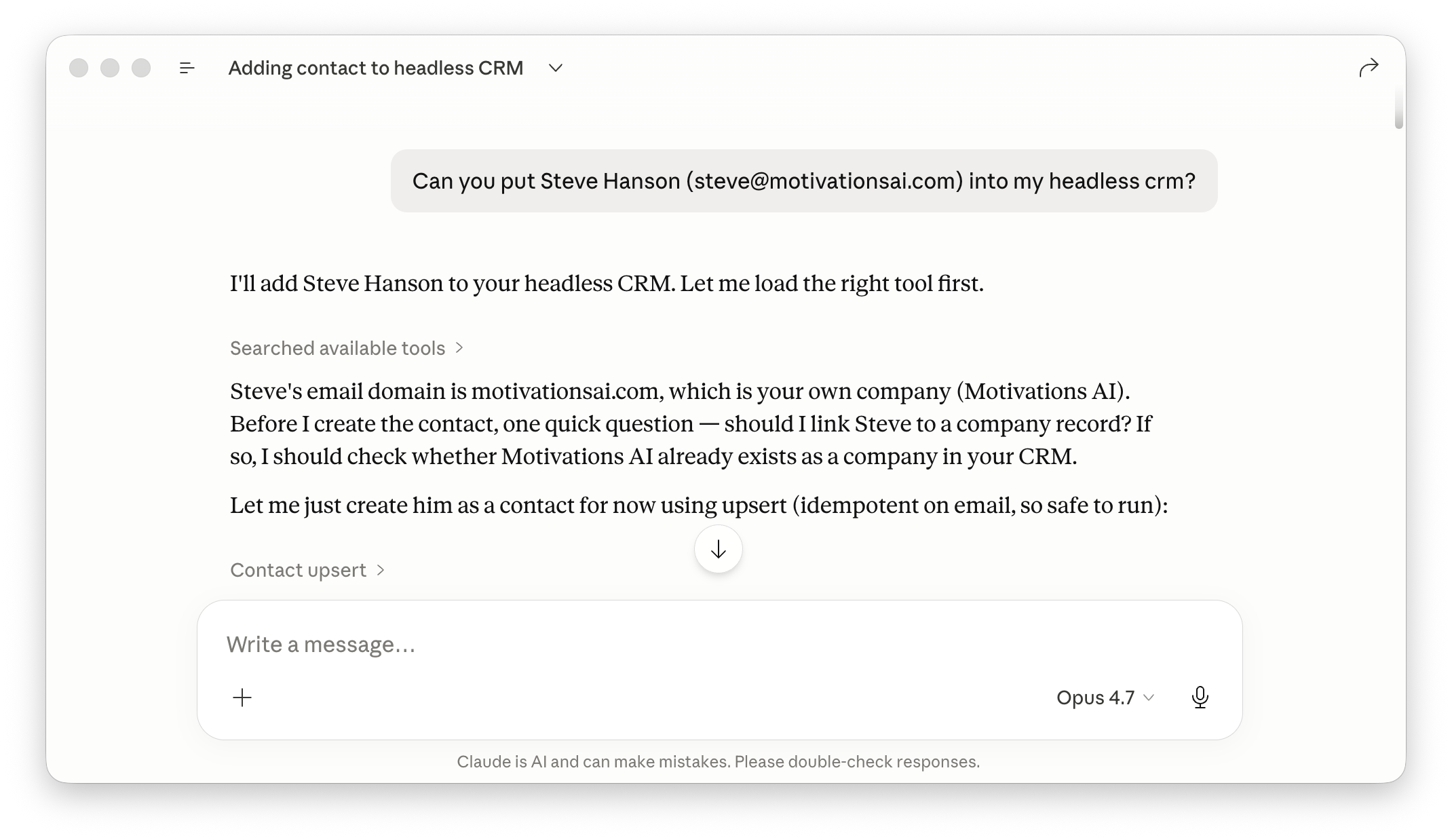
I asked Claude to add Steve Hanson, a real person at Motivations AI, to the CRM. Notice what happens. Claude doesn't have the tool loaded yet, but it knows from MCP that the tool exists, so it loads it. Then it pauses and asks a question I didn't think to ask: should it link Steve to a company record, since his email domain matches my own company?
That pause is doing real work. It's the same kind of judgment a thoughtful executive assistant would apply. Not "I'll just do exactly what you said." More like "before I do this, here's a thing worth deciding."
Then I told Claude to link Steve to the Motivations AI company.
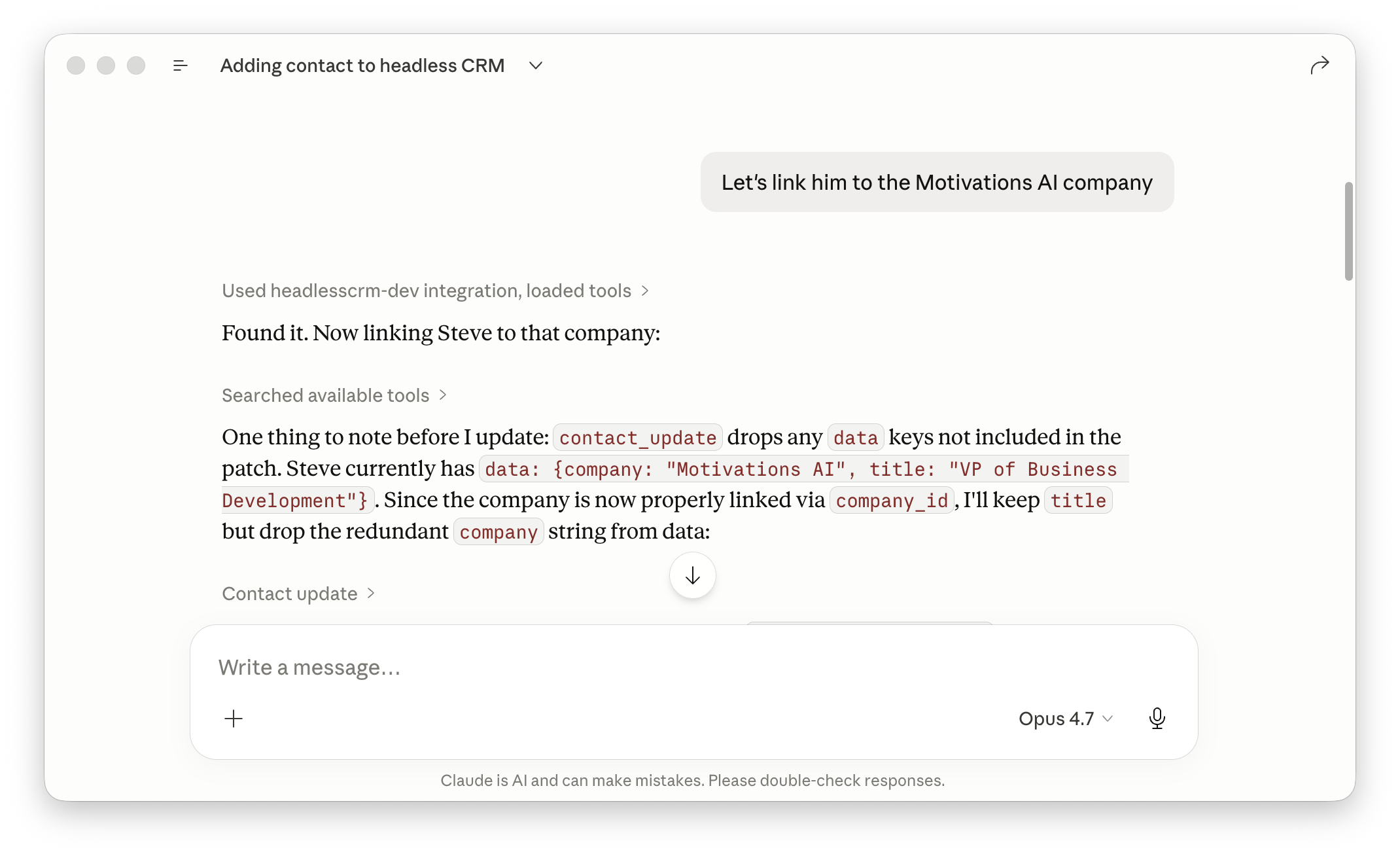
Look at the second paragraph. Claude noticed that the contact_update tool drops any data keys not included in the patch. Steve already had data: {company: "Motivations AI", title: "VP of Business Development"}. So Claude figured out: since the company is now properly linked via company_id, the company string inside data is redundant, and updating without it would silently drop title too.
That's a tool semantics decision I would have had to think through if I'd been clicking buttons in a CRM admin. Claude handled it because it read the tool descriptions and reasoned about the schema. The CRM didn't need a settings dialog or a help tooltip to communicate any of that. The tool descriptions were the documentation.
Then I asked about tags and custom fields.
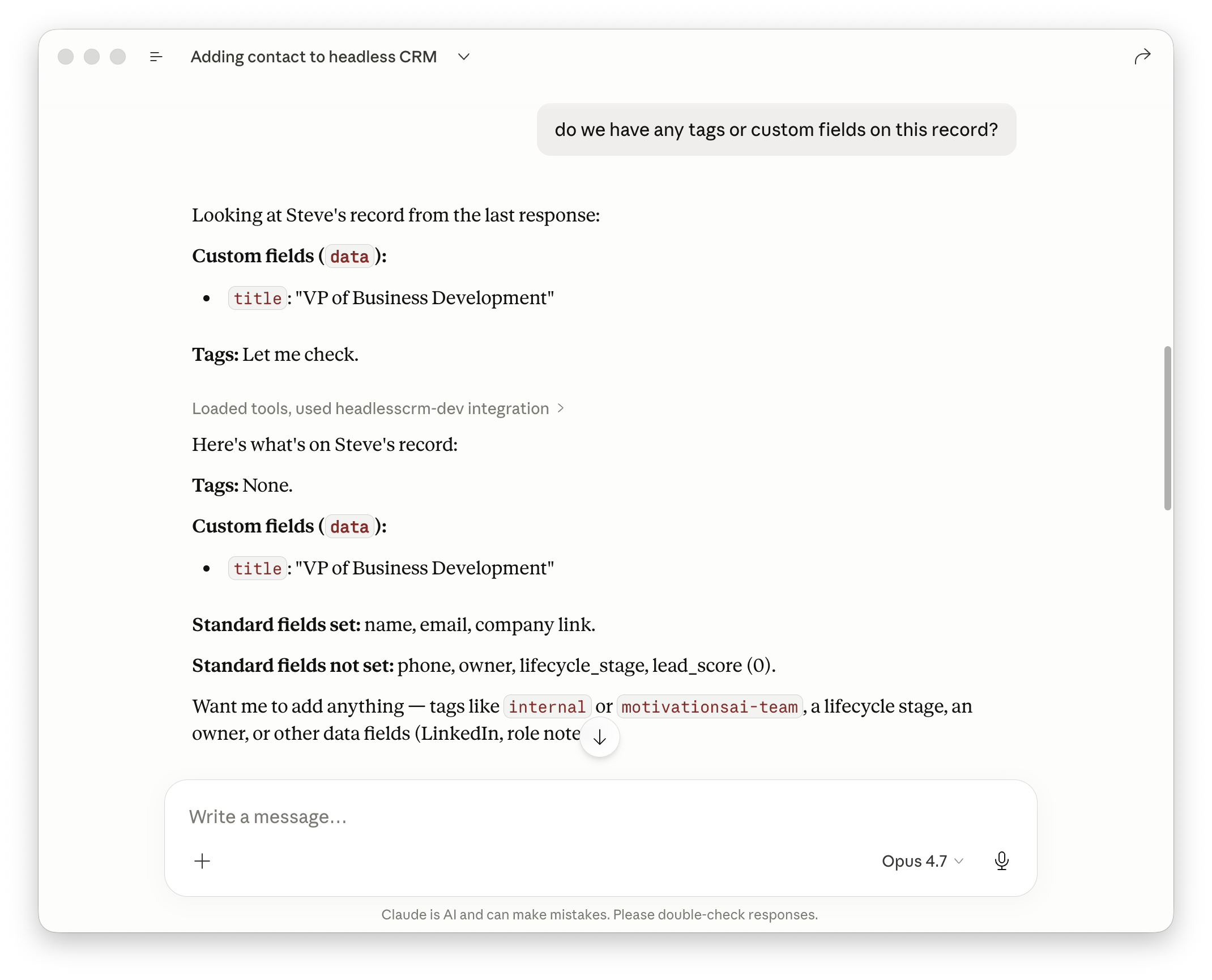
Standard CRM stuff. What's interesting is the texture. Claude doesn't just dump everything it found. It says "Tags: Let me check," makes the call, and reports back with what's set, what's not set, and what could plausibly come next. The mundane work of querying a record is done. The conversation continues in plain English.
Then I added some tags and a custom field.
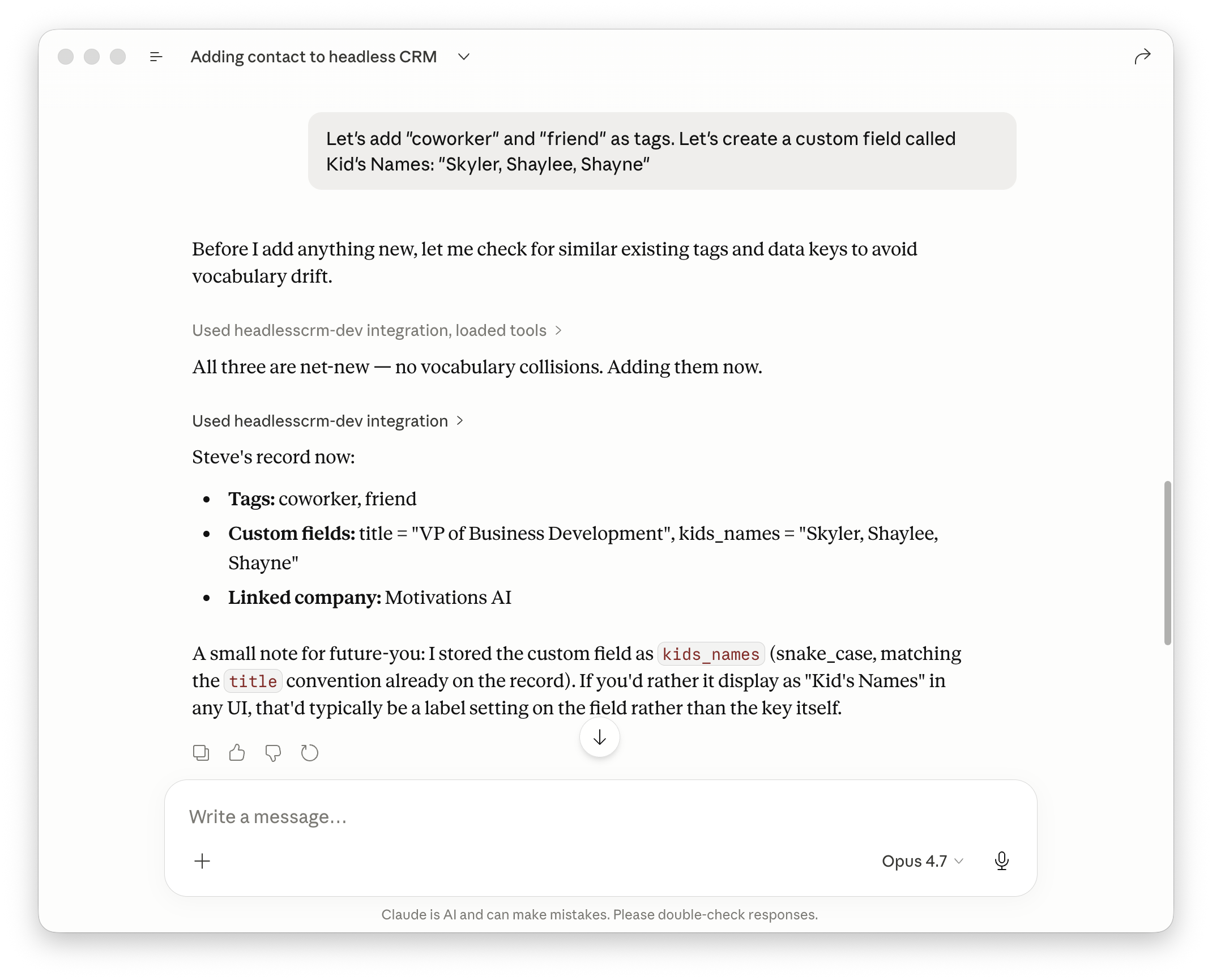
This one is my favorite. I said: add coworker and friend as tags, and create a custom field called Kid's Names. Before doing anything, Claude checked for similar existing tags and similar existing data keys. Why? Because I'd told the CRM, in the system prompt for the MCP server, to watch for vocabulary drift. If I already had a tag called colleague, I probably didn't want to add coworker next to it.
Claude found no collisions, added the new values, and stored the custom field as kids_names in snake_case to match the existing title convention on the record. Then it left a small note: if I want it displayed as "Kid's Names" in any UI, that'd typically be a label setting on the field rather than the key itself.
Read that last bit again. There is no UI for this CRM. There never will be. But Claude is still thinking about how the field would display if there were one, because that's part of being thoughtful about data.
That's the texture I want you to notice. The software didn't get less useful when I removed the screens. It got more useful, because the conversation is the interface, and conversations are more flexible than forms.
Why tool-first beats UI-first for agentic software
When you build software UI-first, the UI carries the meaning. Field labels, form layouts, validation messages, help tooltips, modals, dropdowns. All of it is documentation embedded in pixels. Take the UI away and the software becomes incomprehensible.
When you build software tool-first, the tool descriptions carry the meaning. Each function says what it does, what arguments it takes, what it returns, and what edge cases matter. A human reading the tool descriptions understands the system. An AI reading the tool descriptions understands the system. A future tool I haven't written yet, calling these tools as part of a longer chain, understands the system.
The same set of tools can be operated by:
- Me, talking to Claude
- An autonomous agent doing work on my behalf overnight
- A future personal assistant app I haven't built yet
- Another piece of software that needs to talk to my CRM as part of its own workflow
I didn't have to design five different interfaces. I designed one set of tools. The surfaces are downstream of the tools, and the tools are the actual product.
This is the part I think most builders are missing. Tools are not "the API your devs expose so the front-end team can build screens." Tools are the software now. Screens are an optional surface. So is voice. So is whatever a personal agent decides to do with your tools at 2am while you're asleep.
What this means if you've spent a decade building UIs
Here's what I'd tell you if we were talking about this in person.
Your domain expertise just got more valuable, not less. Knowing how customers actually use a CRM, how deals actually progress, where data drift creeps in, what fields people forget to fill out, what makes a tag taxonomy work or fail, all of that is more important when you're designing tools than when you're designing screens. A bad screen is annoying. A bad tool description sends an AI down the wrong path silently and produces broken data you don't notice for weeks.
The work didn't disappear. It moved up a layer. Instead of "here's the form for adding a contact," the question is "what's the right shape of the contact_create tool, what should it accept, what should it return, what should it refuse to do, and what should its description tell an AI about when to use it versus when to use contact_upsert instead?" That's design work. It's the most interesting kind of design work I've done in years.
If you've spent fifteen years building UIs, you already know things that would take an AI-first builder years to learn. You know which workflows are common and which are edge cases. You know where users get stuck. You know what data gets entered wrong. That knowledge translates directly into better tool design. The people who are going to build the most useful agentic software are the people who already understood why the old software was useful.
The shift isn't from your domain to a new domain. It's from one surface to a different surface, with everything you already know carrying forward.
What I'm doing next
I'm looking at all my products and asking, "how would an agent use this?" and as I answer the question, that becomes my design spec.
Many of the solutions I've built - for me, and for work - have all been built with users (humans) in mind. They all have UI. But the next move is building out a first-class layer for agent consumption.
If you're building software right now and you haven't tried this, I'd encourage you to spend a weekend on it. Pick something small. Something you'd actually use. Build it as a set of tools first. See what it feels like to operate your own software through a conversation instead of a screen.
You'll either come away thinking I'm wrong, or you'll come away the way I did, which is convinced that the next decade of software is going to be built by the people who got here first.
I think it's worth being one of them.
A story. An insight. A bite-sized way to help.
Get every article directly in your inbox every other day.
I won't send you spam. And I won't sell your name. Unsubscribe at any time.
About the Author
Chris Lema has spent twenty-five years in tech leadership, product development, and coaching. He builds AI-powered tools that help experts package what they know, build authority, and create programs people pay for. He writes about AI, leadership, and motivation.