January 25, 2014 | Chris Lema
Using Gravity Forms and MailChimp to give my readers more choice
I write daily. Some people have asked for a way to get my posts, but weekly instead of daily. So here's how I used Gravity Forms and MailChimp to do it.
You should listen to Mark...
If you've spent time in the WordPress community, then you know who Mark Jaquith is. When Mark speaks (or writes), people listen.
Except me. At least not right away.
Back in September, I complained that someone had unsubscribed from my daily email newsletter because there were too many emails coming. I joked that I needed to do a better job defining "daily".
https://twitter.com/markjaquith/status/378566798267801600
Mark's response was a great idea but one that I didn't know how to implement just yet. Part of it was figuring out how to actually do it. Part of it was figuring out how to clean up the mess I'd made in MailChimp.
Mess?
Yes, I had created lists for everything. And suddenly things were getting complicated. So I started doing some research. But just as I found segments, I discovered they wouldn't do what I wanted.
Then, in the midst of a call with Syed Balkhi, he introduced me to MailChimp groups. And things started getting better immediately.
Introduction to MailChimp Groups
Here's my introduction to MailChimp groups - in video (watch in 720p for best resolution).
Here are snapshots of the inside of my MailChimp account.
Getting Gravity Forms and MailChimp to work together
The final result, the entire objective, is to do exactly what Mark was suggesting - to give my readers an option (daily or weekly).
To do that, you'd first have to activate the MailChimp add-on for Gravity Forms.
Step two is creating the form to collect subscribers. Since I already had one, I needed to add a field (a drop down) to give people the choice.
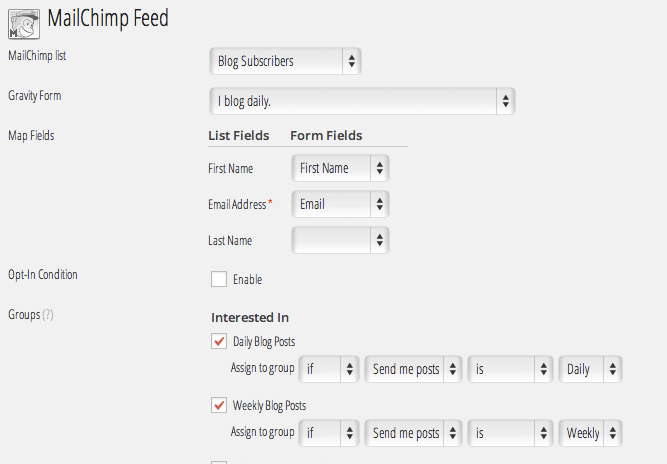
This is the field I'll use when I create the integration between Gravity Forms and Mailchimp. In step three, you do that by heading to Forms > MailChimp and adding a feed.
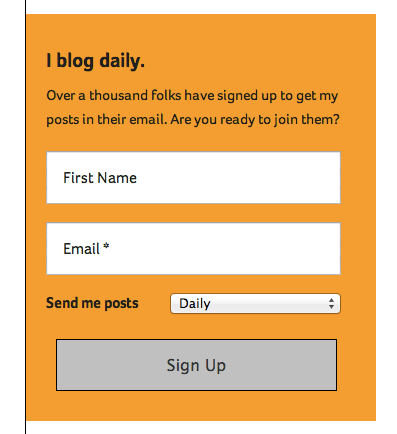
And the final result is a form that gives the user a choice when they subscribe.
The final result was that after I sent an email today (a weekend day) letting subscribers know they could switch to weekly, I had 66 folks immediately make the call.
So once again, Mark was right on the money! Thanks!
A story. An insight. A bite-sized way to help.
Get every article directly in your inbox every other day.
I won't send you spam. And I won't sell your name. Unsubscribe at any time.
About the Author
Chris Lema has spent twenty-five years in tech leadership, product development, and coaching. He builds AI-powered tools that help experts package what they know, build authority, and create programs people pay for. He writes about AI, leadership, and motivation.