June 22, 2021 | Chris Lema
Gutenberg lets you copy and paste layouts!
Ok, let's just say that today I figured something out that is bound to help me a bunch, and I didn't even realize it was possible. Did I know that Gutenberg saves stuff as comments in the text itself? Yes.Did I know that Gutenberg layouts are made up of blocks? Absolutely.Did I know that Gutenberg...
Ok, let's just say that today I figured something out that is bound to help me a bunch, and I didn't even realize it was possible.
- Did I know that Gutenberg saves stuff as comments in the text itself? Yes.
- Did I know that Gutenberg layouts are made up of blocks? Absolutely.
- Did I know that Gutenberg was supporting a pattern directory? Yes.
- Did I know that Gutenberg lets you copy and paste layouts? No way.
I submitted a pattern the other day but had it rejected - because they already had enough three column layouts and I used the wrong images. But they were super polite about it.
So I thought I would maybe try again.
And it was in this process that I discovered something brand new. Something I never thought about, and didn't know.
Coping and pasting layouts is easy with Gutenberg
That I could design something, copy it, and paste it - even on another site- and it would still work.
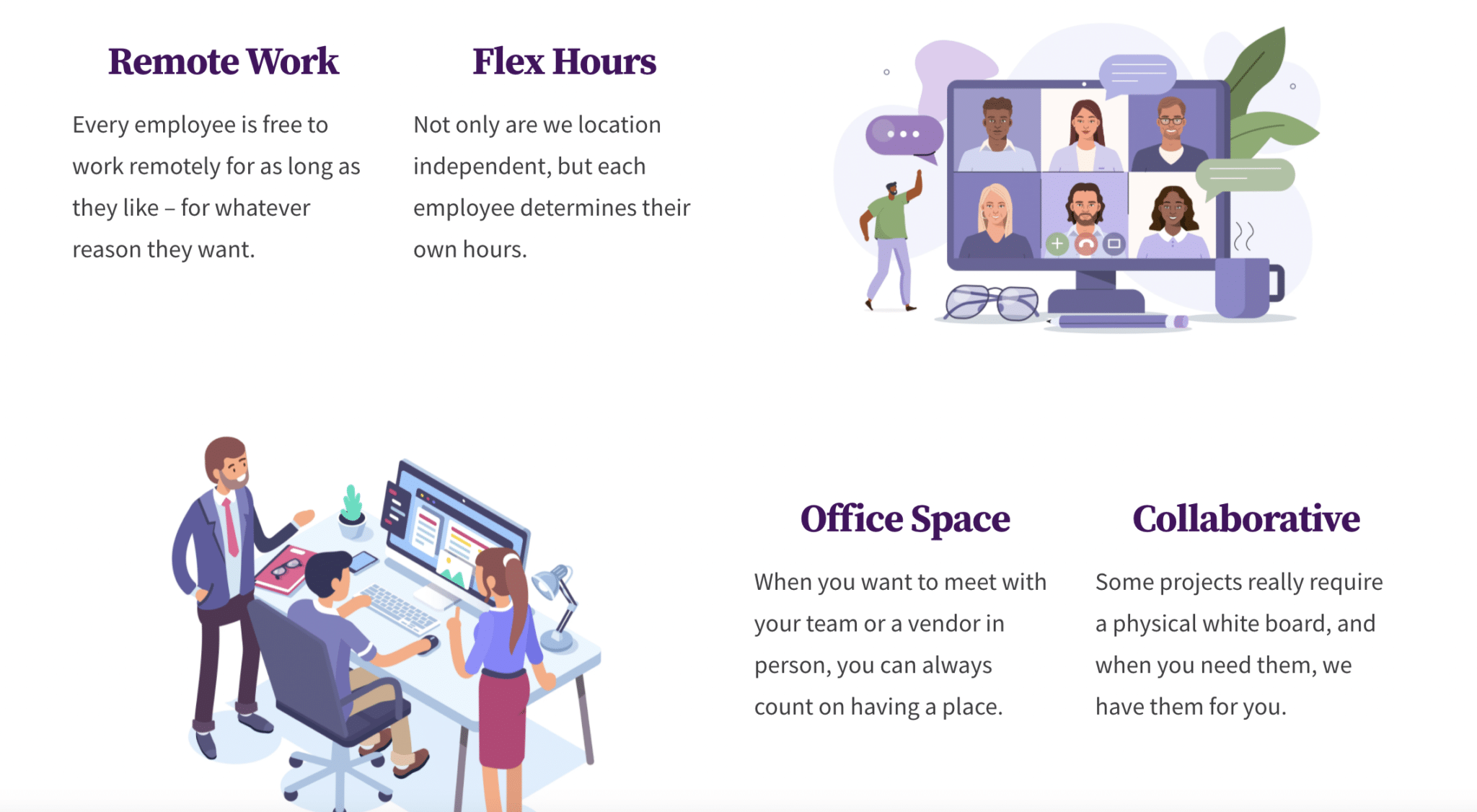
Pictures are easier to understand than words, so let me show you what I'm talking about. This is a four column, two row layout. You can see it here.
When you look at the top toolbar in Gutenberg, you see this three row, little line icon, on the left side. It's the outline feature and shows you a layout in outline mode. You can click the parent of that outline and copy the whole thing.
When I paste that in text, in a Gist, or anywhere else, it looks like this.
<!-- wp:generateblocks/container {"uniqueId":"29e7d5b0","backgroundColor":"#ffffff","align":"full","isDynamic":true} -->
<!-- wp:generateblocks/grid {"uniqueId":"c6b63cf6","columns":3,"verticalAlignment":"center","isDynamic":true} -->
<!-- wp:generateblocks/container {"uniqueId":"cb85f2c9","isGrid":true,"gridId":"c6b63cf6","width":25,"paddingTop":"0","paddingRight":"0","paddingBottom":"0","paddingLeft":"0","isDynamic":true} -->
<!-- wp:generateblocks/headline {"uniqueId":"52029778","element":"h3","alignment":"center"} -->
<h3 class="gb-headline gb-headline-52029778 gb-headline-text"><span style="color: #461060;" class="ugb-highlight">Remote Work</span></h3>
<!-- /wp:generateblocks/headline -->

<!-- wp:paragraph -->
<p>Every employee is free to work remotely for as long as they like - for whatever reason they want.</p>
<!-- /wp:paragraph -->
<!-- /wp:generateblocks/container -->

<!-- wp:generateblocks/container {"uniqueId":"dcf9fe7f","isGrid":true,"gridId":"c6b63cf6","width":25,"paddingTop":"0","paddingRight":"0","paddingBottom":"0","paddingLeft":"0","isDynamic":true} -->
<!-- wp:generateblocks/headline {"uniqueId":"cb704601","element":"h3","alignment":"center"} -->
<h3 class="gb-headline gb-headline-cb704601 gb-headline-text"><span style="color: #461060;" class="ugb-highlight">Flex Hours</span></h3>
<!-- /wp:generateblocks/headline -->

<!-- wp:paragraph -->
<p>Not only are we location independent, but each employee determines their own hours.</p>
<!-- /wp:paragraph -->
<!-- /wp:generateblocks/container -->

<!-- wp:generateblocks/container {"uniqueId":"ef5bdecc","isGrid":true,"gridId":"c6b63cf6","paddingTop":"0","paddingRight":"0","paddingBottom":"0","paddingLeft":"0","isDynamic":true} -->
<!-- wp:image {"id":55592,"sizeSlug":"large","linkDestination":"none"} -->
<figure class="wp-block-image size-large"><img src="/images/shutterstock_1855061620.jpg" alt="" class="wp-image-55592"/></figure>
<!-- /wp:image -->
<!-- /wp:generateblocks/container -->
<!-- /wp:generateblocks/grid -->

<!-- wp:generateblocks/grid {"uniqueId":"9a6ef182","columns":3,"verticalAlignment":"center","isDynamic":true} -->
<!-- wp:generateblocks/container {"uniqueId":"6d2021eb","isGrid":true,"gridId":"9a6ef182","paddingTop":"0","paddingRight":"0","paddingBottom":"0","paddingLeft":"0","isDynamic":true} -->
<!-- wp:image {"id":55593,"sizeSlug":"large","linkDestination":"none"} -->
<figure class="wp-block-image size-large"><img src="/images/shutterstock_1086354308.jpg" alt="" class="wp-image-55593"/></figure>
<!-- /wp:image -->
<!-- /wp:generateblocks/container -->

<!-- wp:generateblocks/container {"uniqueId":"a9481d16","isGrid":true,"gridId":"9a6ef182","width":25,"paddingTop":"0","paddingRight":"0","paddingBottom":"0","paddingLeft":"0","isDynamic":true} -->
<!-- wp:generateblocks/headline {"uniqueId":"8089728d","element":"h3","alignment":"center"} -->
<h3 class="gb-headline gb-headline-8089728d gb-headline-text"><span style="color: #461060;" class="ugb-highlight">Office Space</span></h3>
<!-- /wp:generateblocks/headline -->

<!-- wp:paragraph -->
<p>When you want to meet with your team or a vendor in person, you can always count on having a place.</p>
<!-- /wp:paragraph -->
<!-- /wp:generateblocks/container -->

<!-- wp:generateblocks/container {"uniqueId":"8782bac4","isGrid":true,"gridId":"9a6ef182","width":25,"paddingTop":"0","paddingRight":"0","paddingBottom":"0","paddingLeft":"0","isDynamic":true} -->
<!-- wp:generateblocks/headline {"uniqueId":"65c13d5f","element":"h3","alignment":"center"} -->
<h3 class="gb-headline gb-headline-65c13d5f gb-headline-text"><span style="color: #461060;" class="ugb-highlight">Collaborative</span></h3>
<!-- /wp:generateblocks/headline -->

<!-- wp:paragraph -->
<p>Some projects really require a physical white board, and when you need them, we have them for you.</p>
<!-- /wp:paragraph -->
<!-- /wp:generateblocks/container -->
<!-- /wp:generateblocks/grid -->
<!-- /wp:generateblocks/container -->
I knew this. I knew it would look like this. I just never thought about the next step. That because it was text, I could simply copy and paste this layout to another site.
Today I gave it a try and pasted it on a sample site.
You know what I discovered, right?
That Gutenberg lets you copy and paste layouts!
Why is this important?
When I used Beaver Builder to build sites (which was all the time), I saved rows and layouts all the time. I would export them and import them into new sites and use what I needed and delete the rest.
Why start from scratch if I didn't need to.
That's clearly where things are heading with patterns and Gutenberg. I knew that. But it never crossed my mind that I could do it today, on my own, and re-purpose anything I'd designed from one site to another.
A story. An insight. A bite-sized way to help.
Get every article directly in your inbox every other day.
I won't send you spam. And I won't sell your name. Unsubscribe at any time.
About the Author
Chris Lema has spent twenty-five years in tech leadership, product development, and coaching. He builds AI-powered tools that help experts package what they know, build authority, and create programs people pay for. He writes about AI, leadership, and motivation.