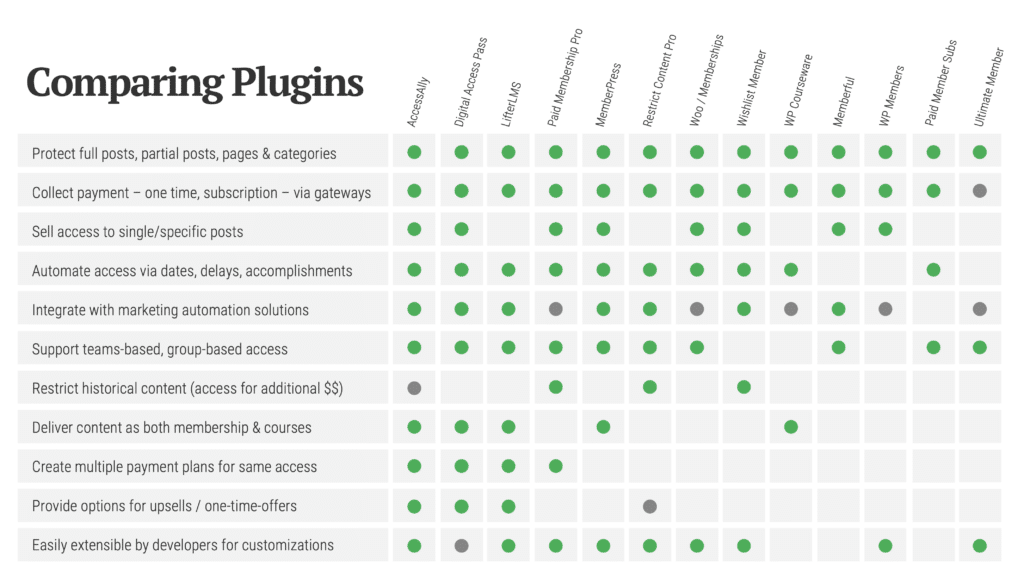
Comparing WordPress Membership Plugins

There are a lot of Membership Plugins Out There

If we’re going to talk a bit about membership plugins for WordPress, we need to start with the most obvious – there are a lot of options out there. Want me to cut to the chase? Let me “bottom-line” it for you. The good news is that unlike a few years ago, many of them have improved to the point where they all offer a lot of the same features. That’s great news because it hasn’t always been the case. That said, which one is the best? Which one wins?

Your Values Drive the Winner

There is no point (at least in my mind) to score the plugins and tell you which one got the best score (though I did it and have the spreadsheet to prove it). And you know why already. Because what you care about and what I care about may be different. More than that, you may care about different things based on the site you’re creating. So it comes down to what you care about most. So what I’m not going to do is give you a sorted order of the best ones. Instead, what I want to do is give you the top two plugins you should check out based on the factor you care most about.

I’m going to cover four different drivers of your decision:

  • Price
  • Content Dripping
  • Pausing Memberships
  • Using Stripe

Sound good?

1. If you care most about Price…

If your pocket book drives your choices – and seriously, who isn’t in that category sometimes – then there is some great news for you today because honestly, two plugins are worth noting.

  1. I wrote about Paid Memberships Pro the other day when describing an online course. It is free. 100% free. That means you can download it for free. You can also review the code for free. You can change it for free. You can install it on 1 site for free – and you can do it on 100 sites for free. That’s amazing, isn’t it. And it’s easy, quick to install, intuitive and all that! But I’ll tell you this – if you want to drip your content, this isn’t for you.
  2. Luckily, I said I would tell you about the top two in any category. And there’s another low-priced one you need to know about. You’ll likely imagine that I’m going to tell you about S2 Member, or Justin Tadlock’s Members. But the truth is that while both are free, they’re not as easy to use as Paid Memberships Pro. And they don’t do drip (for real) either. So why look at them if you decide PMP isn’t for you. No, the other one I suggest you take a look at is Membership – by the folks at WPMUDev. You can get a single plugin from WPMU Dev for $19. That’s pretty cheap – and it can go on every site you touch. And guess what? It drips content. [Note: right now, on AppSumo, you can get it for $9. That's awesome!]
One more note about both these two options. If you don’t care about drip, but you do want inexpensive and awesome, check out Restrict Content Pro.

2. If you care most about Content Dripping…

Content dripping may be a really big deal for you. Why? Because you don’t want to offer all that great content in one shot and have someone pay, log in, and download it all in one day – right before they quit your monthly fee. Right? So if that’s what you care about, here are the two you may want to look at:

  1. WPMU Dev Membership - Yup, these guys do it, and do it pretty well. You can define levels, and content restrictions and then how long a person stays at that level before moving to the next level. It’s drag and drop, making it pretty simple to do – but trust me, you’ll still need to have the guide (PDF) next to you.
  2. There are three others that offer this feature (Magic Members, Digital Access Pass) and the other: MemberPress. Digital Access Pass costs $167 (because apparently they didn’t get the memo letting them know it wasn’t 2004 anymore). Magic Members and MemberPress cost the same ($99), but MemberPress support is better.

3. If you care about Membership Pausing….

You have a member who wants to take the summer off and you just want to pause the membership and then let them come back and resume like nothing happened, right? Well, turns out not a lot of the membership plugins out there do it. You already know I’m not going to suggest DAP if I don’t have to – even though I think it’s great. I just think it’s ridiculously expensive. So let’s just say that while they do it, there are two others to talk about.
  1. WP eMember – not a plugin that a lot of people talk about (in my circles), but they do it and it’s not too hard. They also have a pretty feature-packed plugin. And at $49 (for 1 or unlimited sites) it’s not too bad.
  2. Wishlist Member is the other one that does it – but at twice the price. The other thing to know about Wishlist is that you don’t have any access to the code itself. From what I hear, they’re working on changing it so that it’s fully 100% GPL.

4. If you care about using Stripe…

Wait a minute, is that really a factor? That’s what you’re thinking, right? Well let’s be honest with each other. I made the list, so I get to pick. Also, it turns out I hate PayPal. If you don’t know about Stripe, check them out. So for me, it’s always a factor. In this case, there really are only two players in the whole space. So guess what? They both jump to the top!

  1. Paid Memberships Pro - it’s free and it supports Stripe natively.
  2. Restrict Content Pro – This is one seriously beautiful plugin. The developer behind it (Pippin Williamson) knows how to write code. And the plugin is only $30 and the Stripe add-on will cost you another $20. At $50, that’s a great deal!
  3. MemberPress - yes, I’m cheating – I’m adding a third option. More expensive than the other two, but it’s awesome.

What are you using for Memberships?

I’m sure I missed something. So what’s your take? What are you using, and why?

About chrislema

Did you like this post? If so, you might like getting my daily post via email - directly in your inbox.

65 Responses to “Comparing WordPress Membership Plugins”

Read below or add a comment...

  1. Jeff Hester says:

    Great article, and thanks for the tip on the AppSumo deal. I picked up a copy based purely on your review (and the deal didn’t hurt, either).

  2. Another great resource man! I ended up buying Membership after Brandon’s presentation at OCWP a few weeks back. For $19 it was still a bargain and I definitely wanted the drip content and multiple membership levels and stuff for a project I’m rolling out soon. Great review overall!

  3. David says:

    Thank you – great article.

    Just wondering if any of the above allow a member to have their own profile page?

    That would be important to me. Thoughts?

    Thank you!

    • chrislema says:

      Many do. Some of them simply show your membership account level. I know Wishlist Member has more extensive add-ons that let you really go to town on that Profile page. You may want to check them out.

  4. Norcross says:

    Something to consider with WishList: they obfuscate their code and it isn’t GPL (by their own words) which makes it harder for developers and users alike to try and do anything outside of what they’ve set up.

    • chrislema says:

      Absolutely. I mention that in #3 (though not the technical dynamics of obfuscation because of my audience). That said, I know users that have never had any desire to mess with code and the folks at WishList have some pretty amazing add-ons that do just about anything. So it depends on if you’re a developer/user who plans to tweak code, or an end user who just wants to pay to get things done. Definitely part of the trade-off to consider.

  5. Brandon Dove says:

    Chris, great write up. There are a million things that could go into writing up a review like this, so I appreciate you not sucking up my morning with a novel. ;)

    One thing I would add though, because this seems like an emerging trend, is that the Membership plugin by WPMU is the only plugin that I know of that handles protection for BuddyPress features (site creation, private messaging, group creation, etc). If you’re looking to add any sort of recurring payment based membership to BuddyPress, Membership is the one you’re looking for. Now, I say this with one caveat: you have to be wiling to use PayPal for payments. For years they’ve been promising support for Auth.net ARB and haven’t delivered. In fact, that’s one of my biggest complaints about the Membership plugin is that, while they continue to refine the plugin slightly over time, they haven’t really added anything to it. Seems like they could really be blowing the rest of these plugins out of the water if they would just make more payment gateways available for it.

    I’ve used Wishlist in the past, and find that it’s surprisingly simple to set up and use for any non-technical user. That being said, as a WordPress developer it makes me scream. The fact that I can’t read through the code and make adjustments or offer improvements kills me.

    • chrislema says:

      Glad you liked it. And I agree that WPMUDev hasn’t really moved things forward with that plugin. And I agree with your sentiments on Wishlist exactly.

      As for the BuddyPress feature protection, I’ll have to go back and see if any of the rest do it. But even as I write that, it’s likely I won’t because I trust your take!

  6. I’ve used S2 many times in the past. Works pretty well, although some aspects of the UI are a little extra basic (like typing post id’s to protect them as opposed to selecting them).

    This month, after many recommendations from friends over the years and a great presentation by Stu Mclaren at Blogworld in NY, I tried Wishlist on an important project.

    It has not been a good experience. I’ve spent the last 16 days going back and forth with support in 5 different tickets. (the first took 12 days)

    Among other things, they put they break their own website up into 4 sites and lock it up in (you guessed it) a Membership site! Normally, I would trust a company that uses their own product in their own business quite a bit. Reminds me of the days ages ago when Larry Ellison switched Oracle Corporation over to Oracle software and saved a $1 billion.

    In this case, Wishlist using wishlist seems to point out the problems with a membership site, especially one split among 4 sub sites (customer, member, insider, products + support). When you need to find something you have to search the 4 different sites and if you don’t pay the extra for insider ($20 / month after purchasing that premium license) you don’t get the information. Plus those sites all seem to use different user/password combinations so you guessed it, four different logins across the sites.

    :(

    The functionality looked more user friendly in the videos as compared to S2. However, experience has taught me that looks easy, does not always mean, is easy. Several of the controls have descriptions that can be interpreted in several different ways, so it makes it very difficult to truly know what you are going to get when you pick a setting.

    For example, if you opt for the setting to insert the more tag after x number of words, to create a free teaser effect with member content after the more, that might sound great.

    however, you must think back to the old days of WordPress when the more tag only did something to a blog on the home page.

    If your home page is not already limited by exercpts or a content limit, then this feature comes into play and ads a more tag to the content dynamically.

    This ended up being a bomb for us. As we had a number of long long articles 1200-2000 words each. We thought we’d put teasers after say 400 words, to get a little seo benefit from providing a decent article freely available.

    Unfortunately, it doesn’t work that way. The single post page is entirely locked down and protected under membership. It only trickles out the teaser on the home page, so this functionality is mostly a bust (although I’d did find a work around using ad injection and short codes). Could have done this more efficiently, but wishlist code is encrypted. they do have an api, but in this case ‘private tags’ were not supported in the 2.0 version of the api as they had been in the 1.0 version. :(

    Then we attempted to setup integration for checkout through Authorize.net. Only simple checkout is available, which means for each member level you create, you have to go over to authorize, create a product in authorize, and link that to the thank you url in wishlist. This also means the checkout will take place (in the authorize.net scenario) off site. They do support several others, some better integrated than others, so make sure you do some deep research to see if your preferred method is supported well.

    Finally, wishlist offers pay per post (not the old blog ad network) functionality. This allows you to protect an article, page or file. A user can buy access to that single item if they choose too as opposed to getting the larger membership.

    The downside is that you have to manually create a buy now button (see that gateway complaint about authorize.net integration). Imagine having a site with say 200 articles or pages that are protected. If you want to have payperpost functionality in addition to a general membership, that means you have to go and create 200 individual buy now buttons and insert them, 1 in each corresponding article. :(

    The video tutorials are mostly 1-3 years old, same with support documentation. This doesn’t exactly make it easy to review its functionality and make a good purchasing decision, let alone execute the setup well.

    I could go on, but I’ll save it for later. :)

    • chrislema says:

      Part of this post is about their website which isn’t part of my review. I will say this, the reason you’ve heard others talk about it positively is because they’ve had positive experiences. I know some people have had a hard time, and others get frustrated by the inability to see/edit code. But I’ve used them first hand and I can tell you that if I had to time myself using S2 and Wishlist, I’m faster in Wishlist every time.

      I do recommend, with all of these plugins to look closely into the features related to payments because many will articulate exactly what level of integration they support with the payment gateways.

      It sounds like it was a poor match for your site. I’d suggest you look at Paid Memberships Pro or the Membership plugin by WPMU Dev (though they don’t support Authorize.net).

  7. Elena Griffith says:

    Thank you Chris! I have a client with two websites that need Membership plug-ins for different reasons.

    1. The first one is just so that we can password one category of reference that is mixed through his 100+ resources that are scattered through 17 different categories. Each article on the site may have 10 references, some in the passworded reference, some not. Once members have entered the password, we want them to be able to move back and forth to the un-passworded sections without having to enter the password again. No payment and he feels one password is sufficient for the site. Membership appears to be the easiest way to solve this requirement on WordPress. Why one passworded category? Those resources utilize a technology that by agreement requires a password.

    Perhaps the free version of Paid Memberships Pro is enough for this.

    2. The second site is already built, has password protect to the whole site and was a free membership site that they are converting to paid membership. It currently uses Gravity Forms with the “Gravity Forms Directory & Add-ons” plug-in by Katz. WordPress is being fully deployed with meeting announcements, resources, and recording of meetings delivered in a WP-Reloaded matrix. The members can add resumes and other materials with posts. There is a separate public site for recruiting new members. Everyone is happy.

    But to take it to individual passwords and member payment requires a rework. Client wants the same membership database to be able to be shared by event management including authorizing free admission to events where the members meet together in person and by chapter. The separate chapters should be manageable by chapter managers. I was looking a Membership Plug-in + Event Espresso but obviously the member database would need to be downloaded and uploaded and there are constant updates making that inconvenient.

    Are there any WordPress membership plug-ins that are built to integrate with event management?

    There will probably be 10 chapters for different geographical locations but each with only about 100 paying members . (They are in a very specialized field.) There will be about the same number of free members who will be able to see event announcements and get event notifications and can attend as guests but do not have access to resources on the site. Total member numbers should top out at under 2,000.

    The client is also looking at Associate Management Systems (AMS) tools for the paid site. He is reluctant to leave WordPress as now he loves it. I doubt that I could integrate an AMS with the WordPress database.

    • chrislema says:

      Hi Elena,
      If you put all those posts into a “password” category, you could protect them with Paid Memberships Pro for free and it would work quite easily.

      For your second site, it sounds like a larger solution that you need to architect carefully. That said, WPMU Dev’s Membership plugin and their new Events & Bookings plugin (http://premium.wpmudev.org/project/events-plus/) might be a good combo to pull it together.

  8. Elena Griffith says:

    Much appreciated Chris! I looked at the two WMPU Dev Plug-ins. They don’t talk about integration with each other on the WPMU Dev website but you think the database could be pulled across?

    Do you think that we would we need to use “multi-site” to manage the chapters. Up to now, I have gotten away with combining them but he hadn’t requested having chapter managers manage chapters. He got this new idea from reading the specs on the Association Management Systems tools. Apparently lots of associations have chapters so this a top of mind feature.

    • chrislema says:

      I’d need a bit of time to think this thru, but I think if it were me, I’d use multisite to create a site for each chapter. I think there could be ways to manage everything else, once that part of the architecture was in place. If you need more help, feel free to use the contact me page to get me your contact details.

      • Elena Griffith says:

        Thank you Chris. I’ll do that!

        • Lisa Sherwood says:

          On Paid Memberships Pro – The tutorial and set-up seems oriented to limiting access to a category on the site not for making an entire site a membership site available with a unique user name and password. That’s all I could figure out from the free documentation, adding it to an existing site and setting up a level of membership page leaving the category selection blank.

          If that is correct, this is great for protecting a category but not a whole site. Can you please confirm Chris?

  9. Brian Duffy says:

    Hey Chris, great post! Of all the dilemmas and problems we have faced building the VLE for my e-learning website – settling on a membership plugin that does what we want and works properly has been the toughest nut to crack. we found it very hard to find helpful, impartial information and many of the review sites are just sales funnels for the affiliate programs.

    The big thing we are looking for is affiliate program integration. We also want support for mail chimp and 2checkout – but that seems to be standard these days.,

    I have already forked out for DAP (which gave me login problems and would not work with WPEngine) and Memberwing (which doesn’t seem to be in the running anymore).

    I am now back at square one – and am looking at magicmembers and wpmu membership.

    Magicmembers looks good but I keep seeing negative reviews about their support. WPMU membership looks good too but the affiliate program happens in the dashboard and I want it to look nice and run it though the wp front end.

    Maybe I should forget about the affiliate program integration? I wonder, in your or your readers experience, what impact an affiliate program has for an online training course? Was it not a consideration at all what you set out to build your e-learning site?

  10. Justin says:

    I am a semi fan of DAP so I thought it was worth noting that DAP’s multisite license is the same price as Wishlists multisite license at $297.

    It’s a pain that it doesn’t work well with caching however which probably explains why one of your other readers is unable to use it with WP Engine.

    As far as affiliate programs go, I would be inclined unless you have a very big name to go with a recognisable affiliate program, rather than running your own. Quite a few people who self run their affiliate programs have been known to not pay out on time if at all.

    There appear to be quite a lot of newish wordpress based membership software coming out.

    One that I would recommend people look at that isn’t wordpress based is called Rapid Residual Pro which is a very robust and solid platform.

  11. sillyandrea says:

    Also have a look at Premise http://getpremise.com – it now has membership features.

    The best part? Studiopress’ new members are is run by our own Premise plugin. :D

    • chrislema says:

      I left Premise out because I have a new article coming out that goes deep into just Premise – on it’s own. It’s a great plugin that keeps getting better.

  12. Syed Balkhi says:

    I’m using S2 Member right now, and it seems to work just great for us. Will be trying out Pippin’s EDD for digital stuff. I have tried Wishlist, and it worked great. It was encrypted, so I left it. After talking with Stu, he seemed real nice. He was always willing to help.

    Great writeup over all :)

  13. Geoff says:

    Thanks for the great post. I didn’t realize that there were so many membership plug-ins out there for WP. Still evaluating the options but thought I’d ask for a recommendation based on the particular implementation. Basically, a WP site with a lot of documents in one category. We want to start out by letting everyone who visits the site see everything. If a user visits a certain number of posts, we would like to require them to register for free. At some point down the road we would want to transition to a paid site membership model. At that point, we’d also like to make it so that the posts themselves do not show full content (perhaps only X characters worth of text) until there is a registration (perhaps a free registration for a period of days that then follows to a paid registration). In reading around it sounds like perhaps WishList may be the way to go but I thought I’d kindly ask for your thoughts on this.

  14. Jacqueline says:

    I am looking for a solution, and I’m not sure a membership plugin will help. I have a wordpress design site. I need multiple users to be able to login, design and save or publish without access to the design or information of the other users.
    Ideally, it would be great to have the user experience the site as if they were the only user.

    Is this possible?

  15. chrislema says:

    In reply to Lisa Sherwood,
    Yes, you protect content on your site – via each user having a login and password. PMP lets you protect pages, as well as categories of posts.

    • Lisa Sherwood says:

      Pages on PMP but not full site. That is good to know. Is there anyway to sell a membership on a public site that issues a user name and password to be used on a fully protected site (could be navigation tab on the public site).

      I also looked at WMPU Membership and although the plug-in is inexpensive, the comments on AppSumo imply that you need to pay the WPMU monthly membership fee or you won’t get updates and that is important.

  16. WildT says:

    Well, nice list, however I can say that WPMU’s Membership plugin is half baked regarding the registration process. Quite a pity for a membership plugin.
    Setting it up is not that easy either. At $79 per month for support it certainly doesn’t come cheap – although this does give you access to all their plugins and themes, But who needs them all? Very clever marketing and their website looks awesome, But that is not what I am buying.
    And support, although very polite and reactive, wasn’t able to solve a critical registration issue using Woocommerce in parallel with Membership. Out of frustration I finally tried s2Member, which is free – the pro version is nice, a one time fee – but the free version is already packed with advanced features, notably regarding content restriction access and security. It’s hard to beat s2Member on these two features. And you get support for a one time fee. And the documentation is awesome. Sure, contrary to Membership which is conceived so as not to touch a single line of code, you need to do your homework a bit, add some code here and there, but it is all very well documented. Laziness never pays, anyway.

    I wish I did try s2Member before buying WPMU’s Membership plugin, and I regret the fact that I had been influenced by reviews that said s2member was hard to use. It isn’t. Much easier than Membership and its funky admin interface. And way more powerful. S2member does not fiddle akwardly with WP’s registration process, and that is a key issue: no plugin execution order problem, no hijacking of concurrent registration forms ever.
    Once you supercharge your WP site with other plugins requiring access to WP’s user roles, like Woocommerce or Gravity, you will understand what I mean.
    Of course WPMU will tell you that they have alternative solutions that work well with Membership, but hey! WP is supposed to be a free, interoperable environment, right?

    What is more, the team behind s2Member only does s2Member not dozens of plugins and themes. That’s another very positive point. They know their stuff and they are betting it all one one single product. They’d better be good right?

    I am in no way related to them and use their free version, should I add.

    • chrislema says:

      Glad S2Member worked well for you. I know it’s been a bear for others and I found it more complicated than it needed to be. Though Membership also was a bit complicated for sequential delivery, which is why Paid Memberships Pro (free – and now has an extension for drip), or MemberPress (not free) are potentially much better options than what’s at WPMUDEV. That said, few membership plugins work as well on a multisite network – so you really need to know what you need, in order to pick the right plugin.

  17. WildT says:

    Hello again,
    I wrote a negative comment yesterday regarding WPMU’s Membership plugin and the issues I had met.
    The support finally solved my problem.
    So I am satisfied and I wanted to add this update to my earlier comment.

    Now that I have discovered s2Member, I think I shall keep it however, because of its unique security features. So I’m grateful the WPMU Membership plugin didn’t work at first, sort of ;)

  18. DeNieD says:

    Hi Chris. What membership plugin does authorize a particolar user to create and publish posts?
    tnx

  19. Eric Heymans says:

    Well Chris,
    I discover your blog a few days ago and I must say it is plenty of usefull and relevant info.

    As I’m a french speaking guy .. please apologizes any mistake I could make.

    I’m using S2 Member, with its “Pro” extension .. and it’s a damn good plugin.
    Not easy not setup .. but once you get the trick .. that’s fine …

    I really love the Amazon S3 integration and support of the RPMT (streaming) protocol which allows you share protected videos .. :) .. and secure them (download denied) .. and deliver them fast …

    … and S2 does drip content .. :) .. but I agree it is not easy to find …and to setup

    Cheers
    Thanks

  20. Weirdrat says:

    why not use Bitcoins ? totally free, totally secure and safe and if you want and care for it – totally anonymous, transactions cost nothing and go around the world to any place within 10 minutes ! http://whatisbitcoin

  21. Serge says:

    I bought a WordPress theme that has very strong WooCommerce integration throughout the site. I love the theme and very much want to find a solution as it fit my needs perfectly.

    I’m looking for the best option for a Membership plugin that would work seamlessly with WooCommerce. WishList seems to be the easiest solution but there is so many negative reviews that I’m extremely hesitant, to say the least, to give it a go. Maybe I give those reviews too much weight?
    Anybody have experience with Groups for WooCommerce combined with WooCommerce Subscriptions? Some Drip Content solution is important.

    I’ve done a lot of research but couldn’t find any solution so I would be very grateful for some advice.

    • chrislema says:

      MemberPress & Premise do drip well but each have their own approach to billing. The only serious integration is what you’ve listed here – Groups & Subscriptions. That’s integrated but doesn’t do drip. So you’ll likely have to pick.

      • Serge says:

        Any idea how good Groups & Subscriptions are? Couldn’t find a review anywhere.

        Should I give WishList a serious look now that they have a new Woocommerce Wishlist Member Extension? I understand that they do not have a real drip function but I probably could make it work since my choices are so limited.

    • Solivier says:

      Hello, I will start a project that require the same plugins (localhost dev for the moment). And I was also wondering if WooCommerce Subscriptions with Groups is the best solution ?

      I need to sell pdf version of magazine on one side (normal wooCommerce with digital download product) and to integrate a subscription for membership with private access to certain post and page content.

      Do these plugins fill these tasks or s2member would be a better solutions ?

      Thx all for your feedback

  22. andersonenvy says:

    Hi Chris, thanks for this comparison. Can you recommend the best of these that would also count analytics/stats/user log-ins? My client wants to be able to keep track of which users logged-in, when, and how many times, etc. Maybe that’s a whole other plug-in I should research that just does that function. Thanks again for the great post.

  23. Andrew says:

    Great Blog. learned alot.

    In my case i looking for a couple of things. The first is Content Dripping and the second is automatically notifying members of new content that has been added. While some of the Membership plugins can support Content Dripping. I’m having a hard time finding one that can automatically notify member when new content has been added. Can you recommend a Membership plugin that support both?

    Thanks!

  24. If you use Buddypress, DAP is not the best solution. But what is more upsetting, DAP Tech Support is really slow to non-responsive. If you have an issue, you will need to buy live support in advance. Once you bought it, tech support remains unsupportive. I purchased live support two weeks ago and still did not get a response as to when we can actually have the session. Run, don’t walk away from DAP.

  25. Z says:

    Hi Chris, Thank for the content. It is really helpful. Can you tell me why you didn’t include MemberMouse? I have no affiliation but found them via google search and just wanted to know if you knew about them and had any comment. Thanks again!

  26. Jerod says:

    I am trying to set up a WordPress site that has 3 membership levels customers buy into and get different “set amounts” of credits for their purchase and use those credits to purchase products from us. This needs to be a recurring cycle so they are billed and get more credits every month. Can you help me figure out what themes and plug ins to use and what I may need to do to make it work. I am not good with code, but have learnt html years ago.

    • Jerod says:

      re: chrislema:

      There are a lot of membership plugins for WordPress out there. How do you pick? Well, the answer depends on what you care most about.

      What I care most about is not spending any more money on things I can’t make work. I have bought “OuterBridge User Credits” but can’t figure out how to apply it to memberships or to purchases. I have installed Paid Membership Pro, but can’t get it to apply the credit system that I mentioned above.
      I was hoping that you could lead me in the right direction.

      • chrislema says:

        No membership plugin will do what you’re hoping it will do out of the box. If you’re a developer, I’m sure you can use the various hooks each plugin gives you. But it won’t be as simple as buying two plugins and hoping they’ll do what you want.

    • chrislema says:

      You need custom programming. Not the right theme or plugin. If you have a budget for that project, contact me using my contact form and I’ll connect you to some great developers in your range.

  27. Hey Chris, great articles on Members plugins. I need a site plugin for membership and to show some basic stats for each member in a few rows. any idea’s which one would suit me best?

  28. bridie says:

    Hi Chris,

    Great review – I’ve used s2 Pro for a client recently and it fitted all the needs – ability for 2 week trial without leaving credit card details, integration with Mailchimp, ability to hide parts of posts. However we ran into trouble because the client has a family trust business structure and his original intention to use PayPal was blown from the water (they don’t deal with Australian family trusts – don’t know about the US or other countries).

    On top of that, the only payment gateways s2 have built in only deal with US and UK companies and bank accounts. We are in Australia, so this is a major problem. The client’s site is basically non-functional because this minor details was missed in the planning (won’t be making that mistake again).So answering your question about other needs – membership plugins that deal with payment gateways for other countries is a big deal.

    Looks like MagicMembers might be the go for us, but so far trying to ascertain if the 2 wee free trial with no CC deets is possible – any idea at your end?

  29. leetramp says:

    Hi Chris,

    Here’s my needs, which I haven’t seen requests for in online reviews. I work with a teachers’ association that has a WordPress website and a traditional mailing list/membership database (kept on a local computer). I’d like to move the membership online, but we don’t need “member only” pages.

    What we’d really like to be able to do is integrate an event registration system with a membership system (most of our members attend one of our two bi-annual conferences). If you attend a conference, you get a year membership; if you don’t, you can still buy a membership, but probably only a few supporters will do that. So we’ll have some members whose memberships lapse, but we’ll keep them in the database and “reactivate” them when they attend a conference.

    We currently handle our local database similar to this, and when someone goes more than five years lapsed, we stop mailing to them.

    The other piece is that we’d like to have physical mailing addresses for some/all of our members (we have that now). It would be ideal to allow members to change an address field in their profile when their address changes. Then four times a year we’ll export the mailing names and addresses and print them on mailing labels (we can do this by importing into Access/Excel, so we don’t need the WP plugin to do this).

    The last piece would be to generate bulk announcement emails to our members, based on their email addresses in the WP membership database. I think most of the membership plugins can do this.

    Any help you can provide would be greatly appreciated.

    Thanks,

    Lee
    http://ncnaapt.org/

  30. Robert says:

    Have you looked at MemberMouse? They seem to have some interesting new features such as previewing upcoming content, user billing updates and one-click cancel options.

  31. paradigmrisk says:

    Chris, what an excellent graphic. I have not used it to decide (as you will see) but it is a superb visual decision aide.

    I need a membership plugin that can grant access based on company name or, preferably, the domain component of an email, eg. xxxx@paradigmrisk.com where anyone logging in with @paradigmrisk.com can access or be recognised as pre-paid. I have not seen this functionality referred to in your review or in any others.

    Any suggestions? Your help would be appreciated.

    Thanks

Leave a Reply